
If you purchased a vehicle in recent years, your car might be carrying a hidden security vulnerability; even if you never paid for an aftermarket car alarm.
Cybersecurity researchers at the University of California, San Diego (UCSD) recently uncovered a major Bluetooth vulnerability in dealer-installed KARR Security Systems (distributed by Acrisure Protection Group / SouthWest Dealer Services). The flaw allows attackers within Bluetooth range to unlock doors, disable alarms, flash lights, sound horns, and prevent parked vehicles from starting.
Here is what you need to know about who is affected, how to check your vehicle, and the step-by-step process to patch your car’s firmware today.
How Many Vehicles Are Impacted and Where Were They Sold?
- Total Vehicles Affected: Over 2.2 million vehicles across the United States and internationally are estimated to have vulnerable KARR hardware installed.
- Primary Region: The vast majority of affected vehicles were sold by dealerships in Southern California.
- Vehicle Brands & Era: The systems were primarily installed at Honda, Toyota, Mazda, Ford, and Jeep dealerships on vehicles purchased between 2017 and July 2026.
The “Hidden Hardware” Problem
When dealerships order inventory, they frequently pre-install aftermarket KARR security hardware on every car on the lot. If a buyer declines the paid alarm service during purchase, dealerships rarely spend the labor time to physically remove the hardware. Instead, the unit remains hidden behind the dashboard in a deactivated state.
Even when deactivated, these units continue to broadcast and accept Bluetooth signals whenever the vehicle is running and for up to 10 minutes after the ignition is turned off; leaving the vehicle exposed to unauthorized commands.
How to Check If Your Vehicle Is Impacted

KARR Window decal
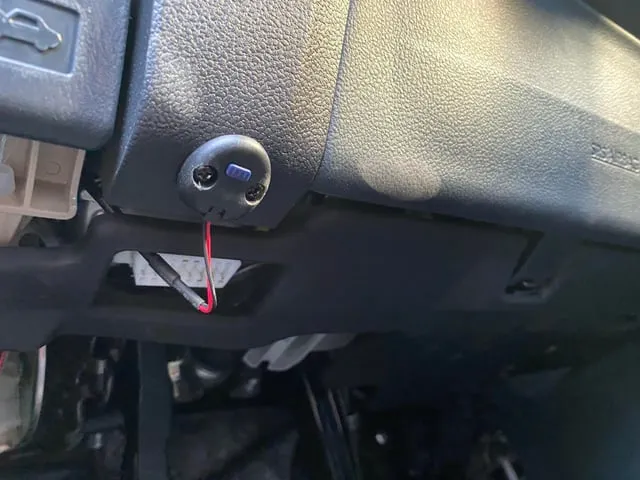
KARR module
Because automakers do not manufacture this third-party hardware, you will not receive an official recall notice or over-the-air update from your car’s manufacturer (such as Ford or Toyota). You must inspect the vehicle yourself. Look for these key indicators:
- Window Decals: Look closely at your driver-side or passenger-side windows for a KARR or SWDS (SouthWest Dealer Services) sticker.
- Under-Dash Module: Look directly underneath the dashboard on the driver’s side (near the steering column or pedal area). Check for a small plastic module featuring a button and a blinking LED light.
- Purchase History: Check your original vehicle purchase paperwork or invoice for any line items mentioning “KARR,” “SWDS,” or dealer-installed theft protection.
Step-by-Step Guide: How to Patch the KARR Firmware
Acrisure Protection Group released a critical firmware patch addressing the shared Bluetooth key vulnerability. Because this is third-party hardware, you must install the patch using your smartphone via Bluetooth.
1.Download the KARR Security App:iOS & Android.
Search for and download the official KARR Security app from the Apple App Store or Google Play Store onto your smartphone.
2.Position Your Vehicle & Enable Bluetooth:In or next to your car.
Turn on your vehicle’s ignition (or place it in accessory mode) so the KARR unit receives power. Ensure Bluetooth is enabled on your smartphone and stand inside or right next to the vehicle.
3.Navigate to the Update Menu:No account required.
Open the KARR Security app. If you do not have an active account or service plan, tap the Customer Service section (or phone number display) at the bottom of the screen, or go to Settings > Customer Service.
4.Initiate the Firmware Update:Requires VIN.
Select Firmware Update. When prompted, enter the last 8 digits of your Vehicle Identification Number (VIN).
5.Complete the Wireless Transfer:Stay near the car.
Allow the app to locate the KARR Bluetooth module and upload the new firmware. Keep the app open and stay near the vehicle until the completion screen confirms the hardware has been patched.
Additional Resources
For detailed official documentation and direct support regarding this firmware update, visit the official update page:
If the app fails to connect or gets stuck during the transfer, reach out directly to the dealership where you purchased the vehicle or contact KARR Customer Support for assistance in scheduling a manual servicing.